In this i like to tell about how to print a movie clip from flash AS2.0.
for this just create a movie clip what it has to print. name it as your wish.
and copy the below code and past it in the frame.
function print_page() {
var my_pj = new PrintJob();
var myResult = my_pj.start();
if (myResult) {
myResult = my_pj.addPage("img_mc2", null, {printAsBitmap:true}, 1);
my_pj.send();
delete my_pj;
trace("asdasdasdasd");
}
}
In the button put the code as
on(release){
print_page();
}
A sample file is in the below link
download rar file zip file
Do u want to search anything in my site just try out the Google search Above next to the head.
Don't forget to leave a comment about this
Showing posts with label Tutorial. Show all posts
Showing posts with label Tutorial. Show all posts
Friday, April 17, 2009


Tuesday, April 14, 2009
Link a url in AS3.0
extension of the old post if you have not read the old one follow the link
button event in AS3.0
In this one i like to explain how to link a url in AS3.0
Step 1:
Create a button with the event and the function. if you are not aware plz read the previous post button event in AS3.0
Step 2:
inside the function write the code to link the URL
You need to create a URLRequest object in the Syntax
var <url_oblect>:URLRequest = new URLRequest(<url string>);
in our example the code will look like
var url:URLRequest = new URLRequest("http://gbala.com/");
Where url is the object and http://gbala.com/ is my website url
once it is done
Step 3:
ask the url to load the site.
navigateToURL(<url string>);
in our example
navigateToURL(url);
Where this line ask to go to the url specified in the URLRequest.
where navigateToURL can have 2 parameter and the second one can be either of this 4
The whole code is as followes...
function button_click(event:MouseEvent):void
{
var url:URLRequest = new URLRequest("http://gbala.com/");
navigateToURL(url);
}
b1.addEventListener(MouseEvent.CLICK, button_click);
in AS2.0 it is just one line code getURL("url");
but in AS3.0 they changed a bit.
Download source code file : Navigate.zip
Do u want to search anything in my site just try out the Google search Above next to the head.
Don't forget to leave a comment about this
button event in AS3.0
In this one i like to explain how to link a url in AS3.0
Step 1:
Create a button with the event and the function. if you are not aware plz read the previous post button event in AS3.0
Step 2:
inside the function write the code to link the URL
You need to create a URLRequest object in the Syntax
var <url_oblect>:URLRequest = new URLRequest(<url string>);
in our example the code will look like
var url:URLRequest = new URLRequest("http://gbala.com/");
Where url is the object and http://gbala.com/ is my website url
once it is done
Step 3:
ask the url to load the site.
navigateToURL(<url string>);
in our example
navigateToURL(url);
Where this line ask to go to the url specified in the URLRequest.
where navigateToURL can have 2 parameter and the second one can be either of this 4
"_self" specifies the current frame in the current window""_blank" specifies a new window. "_parent" specifies the parent of the current frame. "_top" specifies the top-level frame in the current window. The whole code is as followes...
function button_click(event:MouseEvent):void
{
var url:URLRequest = new URLRequest("http://gbala.com/");
navigateToURL(url);
}
b1.addEventListener(MouseEvent.CLICK, button_click);
in AS2.0 it is just one line code getURL("url");
but in AS3.0 they changed a bit.
Download source code file : Navigate.zip
Do u want to search anything in my site just try out the Google search Above next to the head.
Don't forget to leave a comment about this
AS3.0 button event
Hi,
In this i like to specify a simple button example in AS3.0.
Most people says we cant wright code in frame That is FALSE... We can... In this example i has written the code in the frame.
Step 1:
Create a button and place it in the stage... Give the instance name for it In my example i has specified as b1.
Step 2:
Go to the frame Now and add a event listener for that button.
like
Syntax:
<button>.addEventListener(<eventname>, <function_name>);
in our example
b1.addEventListener(MouseEvent.CLICK, button_click);
Step 3:
Write the code for function
Syntax
function <function_name>(<event object>:<event>):<return type>
{
//code for the function
}
in our example
function button_click(event:MouseEvent):void
{
trace("button is clicked");
}
where
button_click is the function Name
event is the object of the MouseEvent
MouseEvent is the event name.
You are done.
Run the file You made a button to work in AS3.0
Hear is the whole code...
function button_click(event:MouseEvent):void
{
trace("button is clicked");
}
b1.addEventListener(MouseEvent.CLICK, button_click);
Do u want to search anything in my site just try out the Google search Above next to the head.
Don't forget to leave a comment about this
In this i like to specify a simple button example in AS3.0.
Most people says we cant wright code in frame That is FALSE... We can... In this example i has written the code in the frame.
Step 1:
Create a button and place it in the stage... Give the instance name for it In my example i has specified as b1.
Step 2:
Go to the frame Now and add a event listener for that button.
like
Syntax:
<button>.addEventListener(<eventname>, <function_name>);
in our example
b1.addEventListener(MouseEvent.CLICK, button_click);
Step 3:
Write the code for function
Syntax
function <function_name>(<event object>:<event>):<return type>
{
//code for the function
}
in our example
function button_click(event:MouseEvent):void
{
trace("button is clicked");
}
where
button_click is the function Name
event is the object of the MouseEvent
MouseEvent is the event name.
You are done.
Run the file You made a button to work in AS3.0
Hear is the whole code...
function button_click(event:MouseEvent):void
{
trace("button is clicked");
}
b1.addEventListener(MouseEvent.CLICK, button_click);
Do u want to search anything in my site just try out the Google search Above next to the head.
Don't forget to leave a comment about this
Sunday, December 21, 2008
Common library for your Flash application
Hi,
In this i like to tell a simple way how to use the same movie clip in all your files with out any searching.
By using Common library.....
First create a file consider your logo so that in what ever file you like to put the corresponding logo can be placed with easy way.
Create a Flash file with a library containing the logos and all your movie clip you want to use.
Place the Flash file in the location
C:\Documents and Settings\
And now check your flash windows -> common libraries You can see the file name you placed :-)
Now whatever movie clip you want to import which is in the common library just go to windows -> common libraries -> You will get the movie clip in a separate library you can drag it to the working area to include in the new file....
Enjoy the cool stuff...
In this i like to tell a simple way how to use the same movie clip in all your files with out any searching.
By using Common library.....
First create a file consider your logo so that in what ever file you like to put the corresponding logo can be placed with easy way.
Create a Flash file with a library containing the logos and all your movie clip you want to use.
Place the Flash file in the location
C:\Documents and Settings\
And now check your flash windows -> common libraries You can see the file name you placed :-)
Now whatever movie clip you want to import which is in the common library just go to windows -> common libraries ->
Enjoy the cool stuff...
Friday, December 19, 2008
Group your flash files
Hi,
In this i like to tell a tips how to handle more flash files to group into a single one file and open the related files whenever you want.

This can be done with a file called flash project file it has the extension .flp
You can do this by going to file->new and the window will appear in that select the Flash project and then add all your fla project and .as files to it by clicking the Add files in the bottom of the project window. you can get the project window from windows->project or Shift+F8

By doing so you no more need to get confuse what are the files involved in the current project.
Planing for a BIG project start with project file in flash
if t is useful plz leave a comment
In this i like to tell a tips how to handle more flash files to group into a single one file and open the related files whenever you want.

This can be done with a file called flash project file it has the extension .flp
You can do this by going to file->new and the window will appear in that select the Flash project and then add all your fla project and .as files to it by clicking the Add files in the bottom of the project window. you can get the project window from windows->project or Shift+F8

By doing so you no more need to get confuse what are the files involved in the current project.
Planing for a BIG project start with project file in flash
if t is useful plz leave a comment
Saturday, December 13, 2008
Make flash full screen in browser
Hi,
In this blog i like to explain How to make the flash in full screen of the browser...
You might notice some of the flash site where you can find all the area of the browser will be a flash That can be done using the publishing setting as follows in flash.
go to file-> publish setting a dialog box will appear in that find weather the HTML tab is available in the below image you can see the image where i sport it out...
Set the corresponding settings
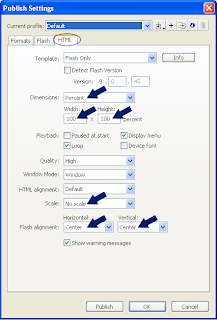
Set as percent in Dimension
By default it will be 100 and 100.if it is not change to 100 and 100.
Set the scale as No scale.
so that your file will not get scale alignment as center and center. So that the flash file will be align in center
Once you set this options just publish the file
You can find a .html file in the folder.
open it in dream viewer Modify->page properties
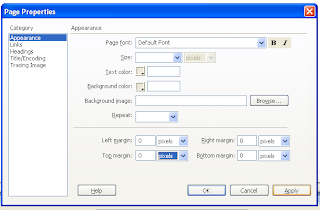
set all margin as 0 (Zero)
Now your flash will be setting to the full screen in browser.
Check it out and enjoy
In this blog i like to explain How to make the flash in full screen of the browser...
You might notice some of the flash site where you can find all the area of the browser will be a flash That can be done using the publishing setting as follows in flash.
go to file-> publish setting a dialog box will appear in that find weather the HTML tab is available in the below image you can see the image where i sport it out...
Set the corresponding settings

Set as percent in Dimension
By default it will be 100 and 100.if it is not change to 100 and 100.
Set the scale as No scale.
so that your file will not get scale alignment as center and center. So that the flash file will be align in center
Once you set this options just publish the file
You can find a .html file in the folder.
open it in dream viewer Modify->page properties

set all margin as 0 (Zero)
Now your flash will be setting to the full screen in browser.
Check it out and enjoy
Tuesday, December 9, 2008
Update a image 3 Option
Hi,
I like to explain how to Update a image in the flash.
Option 1:
In this option you need to know from where you placed the image initially. You need to update that image with New one.
Open the Library (ctrl + l), Right click the image and give update it will update the image so that it will affect the image int the work area.
Option 2:
In this option you no need to know wher was the old images was.
You can open the library and selsct the image and right click and give properties.
a dialog box will get open in that give the click import and select the image you want to update.
it will get updated...
Option 3:
In this option if you thought of updating only one image(in the work area) and the rest must be same you can go for this option.
import the images into the library by file->import-> import to library...
and click the image in the work area open properties (ctrl +F3) and give swap.
The dialog box will open in that select the New images.
I like to explain how to Update a image in the flash.
Option 1:
In this option you need to know from where you placed the image initially. You need to update that image with New one.
Open the Library (ctrl + l), Right click the image and give update it will update the image so that it will affect the image int the work area.
Option 2:
In this option you no need to know wher was the old images was.
You can open the library and selsct the image and right click and give properties.
a dialog box will get open in that give the click import and select the image you want to update.
it will get updated...
Option 3:
In this option if you thought of updating only one image(in the work area) and the rest must be same you can go for this option.
import the images into the library by file->import-> import to library...
and click the image in the work area open properties (ctrl +F3) and give swap.
The dialog box will open in that select the New images.
Saturday, December 6, 2008
Rectangle primitive Tool
Hi,
I like to explain a small tool where most people don't use to use it......
It is called as "Rectangle primitive Tool" by default it use to the the sub tool in the Rectangle tool in Tool panel.

If we thought of drawing a curved edge rectangle this Rectangle primitive Tool is useful.
Even after drawing a curve we can adjust the curves.
It is too efficient in the way like making changes in all 4 corners separately . Where you can get the exact way of you want. The most highlight is you can edit whenever you want.....

I hope you got some New thing regarding flash
Cool fine
I like to explain a small tool where most people don't use to use it......
It is called as "Rectangle primitive Tool" by default it use to the the sub tool in the Rectangle tool in Tool panel.

If we thought of drawing a curved edge rectangle this Rectangle primitive Tool is useful.
Even after drawing a curve we can adjust the curves.
It is too efficient in the way like making changes in all 4 corners separately . Where you can get the exact way of you want. The most highlight is you can edit whenever you want.....

I hope you got some New thing regarding flash
Cool fine
User option button
Hi,
In this i like to explain how to create User option button.
create a movie clip with two frames and make the first frame as off and second as on.
Place the art work like on a option button in first frame as off and second one as on and place a stop(); command in the first frame action script window so it will resemble as the below one...


copy and past the same movie clip option in the main time line and name it as op1 and op2.
which look like the image specified below.


//code is as followes
op1.gotoAndStop("on"); //set The option 1 as default on
op2.gotoAndStop("off"); //set The option 2 as default off
_root.selected_option=1; //storing the selected value for future reference
//function for option 1 button when clicked
op1.onRelease = function()
{
if(_root.selected_option<>1) //check weather the option 1 is not selected
{//if not selected
op1.gotoAndStop("on"); //make the option1 movie clip as on
op2.gotoAndStop("off"); //make the option2 movie clip as off
_root.selected_option=1; //set the value as 1
}
}
//function for option 2 button when clicked
op2.onRelease = function()
{
if(_root.selected_option<>2) //check weather the option 2 is not selected
{//if not selected
op1.gotoAndStop("off");//make the option1 movie clip as off
op2.gotoAndStop("on");//make the option2 movie clip as on
_root.selected_option=2; //set the value as 2
}
}
In this i like to explain how to create User option button.
create a movie clip with two frames and make the first frame as off and second as on.
Place the art work like on a option button in first frame as off and second one as on and place a stop(); command in the first frame action script window so it will resemble as the below one...


copy and past the same movie clip option in the main time line and name it as op1 and op2.
which look like the image specified below.


//code is as followes
op1.gotoAndStop("on"); //set The option 1 as default on
op2.gotoAndStop("off"); //set The option 2 as default off
_root.selected_option=1; //storing the selected value for future reference
//function for option 1 button when clicked
op1.onRelease = function()
{
if(_root.selected_option<>1) //check weather the option 1 is not selected
{//if not selected
op1.gotoAndStop("on"); //make the option1 movie clip as on
op2.gotoAndStop("off"); //make the option2 movie clip as off
_root.selected_option=1; //set the value as 1
}
}
//function for option 2 button when clicked
op2.onRelease = function()
{
if(_root.selected_option<>2) //check weather the option 2 is not selected
{//if not selected
op1.gotoAndStop("off");//make the option1 movie clip as off
op2.gotoAndStop("on");//make the option2 movie clip as on
_root.selected_option=2; //set the value as 2
}
}
Thursday, December 4, 2008
Class and Function in AS3
Hi Guys,
This is my first tutorial in AS3.
The big change in AS2 and AS3 is Object Oriented Programming.
In AS3 all are considered as Object, Class. In this let me say What is Class ? , What is Object? , What is Package and their syntax.
Package:
Package is the collection of class. Class needs to be specified with in a package.
Syntax:
package
{
....
...
}
Class:
Class is the collection of function and variables.
Syntax:
class
{
...
...
}
type can be of 4 types : dynamic, final, internal, public where internal id default.
Object:
Object is the instance of class. Hear is the power of Object oriented programming by creating a single class we can create multiple objects.
var: = new ();
Example with all package, class, object...
//sample.as
package
{
class sample
{
sample()
{
trace("Hi");
}
}
}
//main.fla
var my_obj:sample = new sample();
Note : AS3 is case sensitive.
This is my first tutorial in AS3.
The big change in AS2 and AS3 is Object Oriented Programming.
In AS3 all are considered as Object, Class. In this let me say What is Class ? , What is Object? , What is Package and their syntax.
Package:
Package is the collection of class. Class needs to be specified with in a package.
Syntax:
package
{
....
...
}
Class:
Class is the collection of function and variables.
Syntax:
{
...
...
}
type can be of 4 types : dynamic, final, internal, public where internal id default.
Object:
Object is the instance of class. Hear is the power of Object oriented programming by creating a single class we can create multiple objects.
var
Example with all package, class, object...
//sample.as
package
{
class sample
{
sample()
{
trace("Hi");
}
}
}
//main.fla
var my_obj:sample = new sample();
Wednesday, August 20, 2008
Swap movie clip
Hi,
In this i like to say how to change a single movie clip to other...
Some time we might need to change a particular item in a movie clip we can do that with the option called swap.
It can be done in the way of.
Select the movie clip what you want to change.
Select the properties window(ctr +F3 to open the properties).
Click the button swap and select the movie clip to change.
It will get replaced.
Note : In the case of swap a movie clip inside another Movie clip it will affect all the place where that main movie clip is used movie clip.
In this i like to say how to change a single movie clip to other...
Some time we might need to change a particular item in a movie clip we can do that with the option called swap.
It can be done in the way of.
Select the movie clip what you want to change.
Select the properties window(ctr +F3 to open the properties).
Click the button swap and select the movie clip to change.
It will get replaced.
Note : In the case of swap a movie clip inside another Movie clip it will affect all the place where that main movie clip is used movie clip.
Wednesday, July 30, 2008
Problem and solution of simple pre loader
Hi,
This can be specified as the continuation of the older post where i like to say where we cant use the simple pre loader
Problem
* when you load a swf inside another movie and the inside movie has this script then this will not work. Since this will check for the root movie clip where that is all ready loaded in the client system.
Solution
* insterd of using the _root replace it with the key word this where this will be referring the present/current swf so that the problem will be solved.
This solves a major problem since we no need to care of which swf is getting loaded to which one.
But still some more question rises yes let me tell what is the next step of pre loader in the Advanced pre loader.
This can be specified as the continuation of the older post where i like to say where we cant use the simple pre loader
Problem
* when you load a swf inside another movie and the inside movie has this script then this will not work. Since this will check for the root movie clip where that is all ready loaded in the client system.
Solution
* insterd of using the _root replace it with the key word this where this will be referring the present/current swf so that the problem will be solved.
This solves a major problem since we no need to care of which swf is getting loaded to which one.
But still some more question rises yes let me tell what is the next step of pre loader in the Advanced pre loader.
simple Preloader
Hi,
In this I like to tell how to create a pre loader
place a dynamic text field with the name pre. Make sure this text box extends in the first 3 frames
Frame 1 code:
per.text = "0%";
Frame 2 code:
pre.text = (Math.floor(_root.getBytesLoaded()/_root.getBytesTotal()*100)+"%");
if (_root.getBytesLoaded() == _root.getBytesTotal()) {
pre.text = "100%";
gotoAndPlay("main_movie");
}
Frame 3 code:
gotoAndPlay(2);
Frame 4:
Place a label as main_movie
This is the most common and simple type of pre loader
as i all ready specified place a dynamic text field which is over there in all the first 3 frame
this will start play in that case the first frame will set the text field as 0%.
Then it will come to 2nd frame and check weather the total size of file in bytes is equal to total number of bytes loaded, if it is equal it will go and play the 4th frame where it is named as main_movie or else it will go to the 2nd frame where it will check once again for the total bytes loaded with the Total file size.
hope this will help...
Let me tell some advanced type of pre loader soon.
In this I like to tell how to create a pre loader
place a dynamic text field with the name pre. Make sure this text box extends in the first 3 frames
Frame 1 code:
per.text = "0%";
Frame 2 code:
pre.text = (Math.floor(_root.getBytesLoaded()/_root.getBytesTotal()*100)+"%");
if (_root.getBytesLoaded() == _root.getBytesTotal()) {
pre.text = "100%";
gotoAndPlay("main_movie");
}
Frame 3 code:
gotoAndPlay(2);
Frame 4:
Place a label as main_movie
This is the most common and simple type of pre loader
as i all ready specified place a dynamic text field which is over there in all the first 3 frame
this will start play in that case the first frame will set the text field as 0%.
Then it will come to 2nd frame and check weather the total size of file in bytes is equal to total number of bytes loaded, if it is equal it will go and play the 4th frame where it is named as main_movie or else it will go to the 2nd frame where it will check once again for the total bytes loaded with the Total file size.
hope this will help...
Let me tell some advanced type of pre loader soon.
Friday, July 4, 2008
Nice trick to load a flash site or html site
Hi,
This is a simple but tricky way of loading flash website or html site.
basically most people use to create two website with flash version and html version of same site.
In that case some use to go for a complected way to solve this way this is some simple way to solve this.
Situation: is if the browser has a flash player installed then it needs to link to flash site and if there is no flash player then it will link to the HTML site.
Solution:
Step 1 : make ready the main flash site and the html site. let consider the htmlsite main page as html_main.html and flashsite as flash_main.html.
Step2 : create a separate flash file with the low dimension 1 X 1.
Step3 : In this first frame place a code to load the flash site as getURL("flash_main.html");
step4 : in the file which has the 1X1 dimention file put the code as
your got the result. Simple right check below how it work...
How it work.
If the flash player is installed then the flash will get load and it will load the flash site this is the first case.
If the flash player is not there it will not load any flash file (the 1X1 dimention file) and no redirecting to the flash site will happen.
In that place the code in the html page will refresh and redirect the html page to the new html site this is second case...
Most people might knowing this logic but any how i found this logic intresting so i shared with you...
i has also put the same procedure to my site www.gbala.com...
Cool enjoy...
This is a simple but tricky way of loading flash website or html site.
basically most people use to create two website with flash version and html version of same site.
In that case some use to go for a complected way to solve this way this is some simple way to solve this.
Situation: is if the browser has a flash player installed then it needs to link to flash site and if there is no flash player then it will link to the HTML site.
Solution:
Step 1 : make ready the main flash site and the html site. let consider the htmlsite main page as html_main.html and flashsite as flash_main.html.
Step2 : create a separate flash file with the low dimension 1 X 1.
Step3 : In this first frame place a code to load the flash site as getURL("flash_main.html");
step4 : in the file which has the 1X1 dimention file put the code as
<META HTTP-EQUIV="Refresh" CONTENT=5; URL=html_main.html">in the first line of your main index file.
your got the result. Simple right check below how it work...
How it work.
If the flash player is installed then the flash will get load and it will load the flash site this is the first case.
If the flash player is not there it will not load any flash file (the 1X1 dimention file) and no redirecting to the flash site will happen.
In that place the code in the html page will refresh and redirect the html page to the new html site this is second case...
Most people might knowing this logic but any how i found this logic intresting so i shared with you...
i has also put the same procedure to my site www.gbala.com...
Cool enjoy...
How to get the frame number
HI,
This is not much useful but will be needed for some reason.
There is a function called _currentframe which is used to get the current time line frame.
This is also used inside the movie clip like movieclip_name._currentframe which will return the particular movie clip's current frame number.
eg
trace(mc_1._currentframe );
displayes the mc_1 movie clip current frame number
This is not much useful but will be needed for some reason.
There is a function called _currentframe which is used to get the current time line frame.
This is also used inside the movie clip like movieclip_name._currentframe which will return the particular movie clip's current frame number.
eg
trace(mc_1._currentframe );
displayes the mc_1 movie clip current frame number
Wednesday, July 2, 2008
transparent page in flash
Hi
I like to say how to create transparent background in flash for a web page.
Create a flash with a transparent effect...
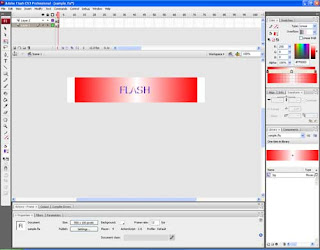
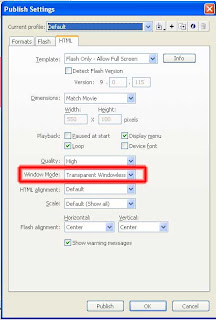
and save the file and select file -> publish setting (second image)
select the html tag and select window mode as "transparent window" the file you will get a html file with transparent option file.
How to check this:
* You can change your back ground color and get the transparent file affect the flash file.
Like the output shown below where i specified below is with blue back color

the check will be similar to this below image
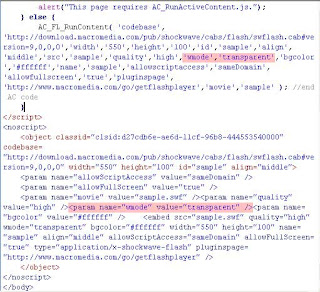
Enjoy getting this.
I like to say how to create transparent background in flash for a web page.
Create a flash with a transparent effect...


and save the file and select file -> publish setting (second image)
select the html tag and select window mode as "transparent window" the file you will get a html file with transparent option file.
How to check this:
* You can change your back ground color and get the transparent file affect the flash file.
Like the output shown below where i specified below is with blue back color

the check will be similar to this below image

Enjoy getting this.
Friday, June 20, 2008
getBytesLoaded,getBytesTotal
Hi guys,
In this i like to tell a function called
getBytesLoaded
This is a function used to find out how much of bytes loaded in the system.
getBytesTotal
This is a function used to find what is the total size of the flash file which is getting loaded.
this are the two function used to create a preloader.... In my next tutorial i will explain the preloader with example...
catch you soon...
In this i like to tell a function called
getBytesLoaded
This is a function used to find out how much of bytes loaded in the system.
getBytesTotal
This is a function used to find what is the total size of the flash file which is getting loaded.
this are the two function used to create a preloader.... In my next tutorial i will explain the preloader with example...
catch you soon...
Wednesday, June 18, 2008
setting different style in a single text box
Hi Guys,
I like to explain you some of my tips in editing the text with different font in a single text box.

This is not much difficult even though in some case it will be useful. This will work fine in the normal static box if you go for the dynamic text box like in the case of more content with scroll bar this will be more useful

meet you in the next soon
I like to explain you some of my tips in editing the text with different font in a single text box.

This is not much difficult even though in some case it will be useful. This will work fine in the normal static box if you go for the dynamic text box like in the case of more content with scroll bar this will be more useful

- Place a text box (you can refer my old topic to place the text bix and set the scroll bar).
- You can find a button with the symbol <> just click it and you can edit a particular text and modify
meet you in the next soon
Tuesday, June 3, 2008
cookies in flash
Hi
in this section i like say few tips like how to store cookies with flash...
SharedObject:
This command used to retrieve data from the local system.
SharedObject.getLocal("user_profile");
will get the value from the file called user_profile where each swf will be stored in different location related to the name of the file.
let me specify a example on it
user = SharedObject.getLocal("user_profile");
if (user.data.name == undefined)
{
user.data.name="cookie";
trace("cookie is stored");
}
else
{
trace(user.data.name);
}
let me explain the code above
user = SharedObject.getLocal("user_profile");
this line will read the data from the local system.
if it find any value it will read the value of the variable or it will specify undefined if it is empty.
by checking the value of the variable we can ad the stored cookie value.
The line user.data.name="cookie"; will store the value cookie to the variable user.data.name.
Useful in.
This will be used to store some client detail in to his system like his user name and other detail in his system.
It is also used to find out weather the person has come to our site or not.
in this section i like say few tips like how to store cookies with flash...
SharedObject:
This command used to retrieve data from the local system.
SharedObject.getLocal("user_profile");
will get the value from the file called user_profile where each swf will be stored in different location related to the name of the file.
let me specify a example on it
user = SharedObject.getLocal("user_profile");
if (user.data.name == undefined)
{
user.data.name="cookie";
trace("cookie is stored");
}
else
{
trace(user.data.name);
}
let me explain the code above
user = SharedObject.getLocal("user_profile");
this line will read the data from the local system.
if it find any value it will read the value of the variable or it will specify undefined if it is empty.
by checking the value of the variable we can ad the stored cookie value.
The line user.data.name="cookie"; will store the value cookie to the variable user.data.name.
Useful in.
This will be used to store some client detail in to his system like his user name and other detail in his system.
It is also used to find out weather the person has come to our site or not.
Friday, May 30, 2008
_global variable
Hi,
This is most known function to any one use flash action script.
If you want to store a value for the entire website then we can use the _global variable where it can holed any type of data.
we can assign a value with the prefix _global.
where this will create a variable for the whole flash so that you can use this value where ever you want after declare or assign a value.
syntax :
_global.variablename ="";
eg:
_global. variablename ="This is a global variable.";
Thank you,
catch you soon...
This is most known function to any one use flash action script.
If you want to store a value for the entire website then we can use the _global variable where it can holed any type of data.
we can assign a value with the prefix _global.
where this will create a variable for the whole flash so that you can use this value where ever you want after declare or assign a value.
syntax :
_global.
eg:
_global.
Thank you,
catch you soon...
Subscribe to:
Posts (Atom)